Files
upstream-mirror 240db4e2a7
Some checks failed
Server CI / Postgres (shard 0) (push) Has been skipped
Server CI / Postgres (shard 3) (push) Has been skipped
BuildEnv Docker Image / build-image (push) Failing after 4s
BuildEnv Docker Image / build-image-fips (push) Failing after 4s
Migration Review & Release Notes / Generate migration review & release notes (push) Failing after 3s
Server CI / Build Environment (push) Failing after 3s
Server CI / Postgres (shard 1) (push) Has been skipped
Tools CI / check-style (mattermost-govet) (push) Failing after 4s
Server CI / Postgres (shard 2) (push) Has been skipped
Tools CI / check-style (mmgotool) (push) Failing after 3s
Server CI / Elasticsearch v8 Compatibility (push) Has been skipped
Server CI / OpenSearch v2 Compatibility (push) Has been skipped
Server CI / Postgres FIPS (shard 0) (push) Has been skipped
Tools CI / Test (mattermost-govet) (push) Failing after 3s
Server CI / Postgres FIPS (shard 1) (push) Has been skipped
Server CI / Postgres FIPS (shard 2) (push) Has been skipped
Tools CI / Test (mmgotool) (push) Failing after 3s
Server CI / Postgres FIPS (shard 3) (push) Has been skipped
Server CI / Run mmctl tests (push) Has been skipped
Server CI / Run mmctl tests (FIPS) (push) Has been skipped
Server CI / Merge Postgres Test Results (push) Has been skipped
Server CI / Merge Postgres FIPS Test Results (push) Has been skipped
Server CI / Check backport migrations (push) Has been skipped
Server CI / Check generated files (push) Has been skipped
Server CI / check-style (push) Has been skipped
Server CI / Vet API (push) Has been skipped
Server CI / Build mattermost server app (push) Has been skipped
Server CI / Server CI Complete (push) Failing after 2s
Server CI / Server CI Artifacts (push) Has been skipped
Server CI / Sentry Upload (push) Has been skipped
Server CI / Server CI Report (push) Failing after 5m1s
Server CI Nightly Race / Race Detector (push) Has been skipped
CodeQL / Analyze (go) (push) Has been cancelled
CodeQL / Analyze (javascript) (push) Has been cancelled
Webapp CI Cache Warm / Warm Webapp node_modules Cache (push) Has been cancelled
E2E CI Cache Warm / Warm E2E npm Registry Cache (push) Has been cancelled
API / build (push) Has been cancelled
Web App CI / check-types (push) Has been cancelled
Web App CI / check-lint (push) Has been cancelled
Web App CI / check-i18n (push) Has been cancelled
Web App CI / check-external-links (push) Has been cancelled
Web App CI / test (platform) (push) Has been cancelled
Web App CI / test (mattermost-redux) (push) Has been cancelled
Web App CI / test (channels shard 1/4) (push) Has been cancelled
Web App CI / test (channels shard 2/4) (push) Has been cancelled
Web App CI / test (channels shard 3/4) (push) Has been cancelled
Web App CI / test (channels shard 4/4) (push) Has been cancelled
Web App CI / upload-coverage (push) Has been cancelled
Web App CI / build (push) Has been cancelled
YAML Lint / yamllint (push) Has been cancelled
Push mirrored docker images / cd/Push mirrored docker images (push) Has been cancelled
docs-cd / Build and deploy docs (push) Has been cancelled
Docs CI / build (push) Has been cancelled
E2E Cache Warm: Cypress deps / Warm Cypress deps cache (push) Has been cancelled
Scorecards supply-chain security / Scorecard analysis (push) Has been cancelled
Server CI Weekly / Postgres FIPS (push) Has been skipped
Server CI Weekly / Run mmctl tests (FIPS) (push) Has been skipped
Server CI Weekly / Postgres with binary parameters (push) Has been skipped
Server CI Weekly / Build Environment (push) Failing after 1s
Server CI Cache Warm / Warm Go Module and Build Cache (push) Failing after 2s
Server CI Nightly Race / Build Environment (push) Failing after 1s
snapshot of https://github.com/mattermost/mattermost.git (master, 2026-09-16; blobs > 131072B omitted)
2026-09-16 00:29:55 +05:00

6.0 KiB

title, sidebar_position
title sidebar_position
Personal access tokens 20

Personal access tokens function similar to session tokens and can be used by integrations to authenticate against the REST API. It is the most commonly used type of token for integrations.

Create a personal access token

  1. Enable personal access tokens in System Console > Integrations > Integration Management.
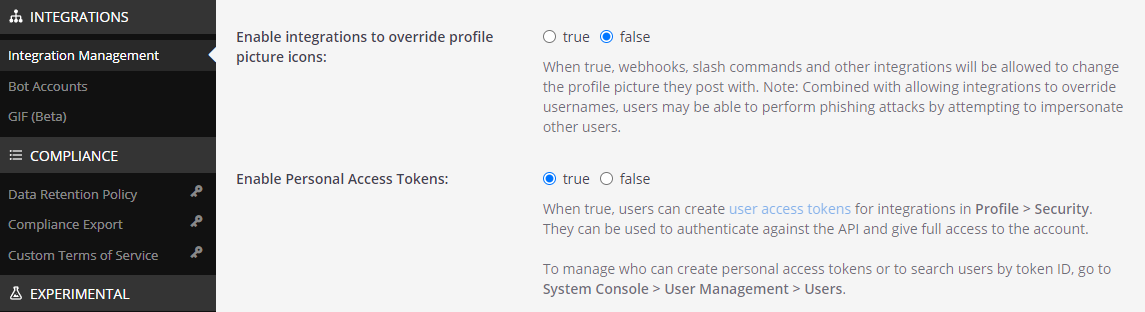
    Enable Access Token Settings under Integration Management using the System Console.

  2. Identify the account you want to create a personal access token with. You may optionally create a new user account for your integration, such as for a bot account. By default, only System Admins have permissions to create a personal access token.

  3. To create an access token with a non-admin account, you must first give it the appropriate permissions. Go to System Console > User Management > Users, search for the user account, then select Manage Roles from the dropdown.
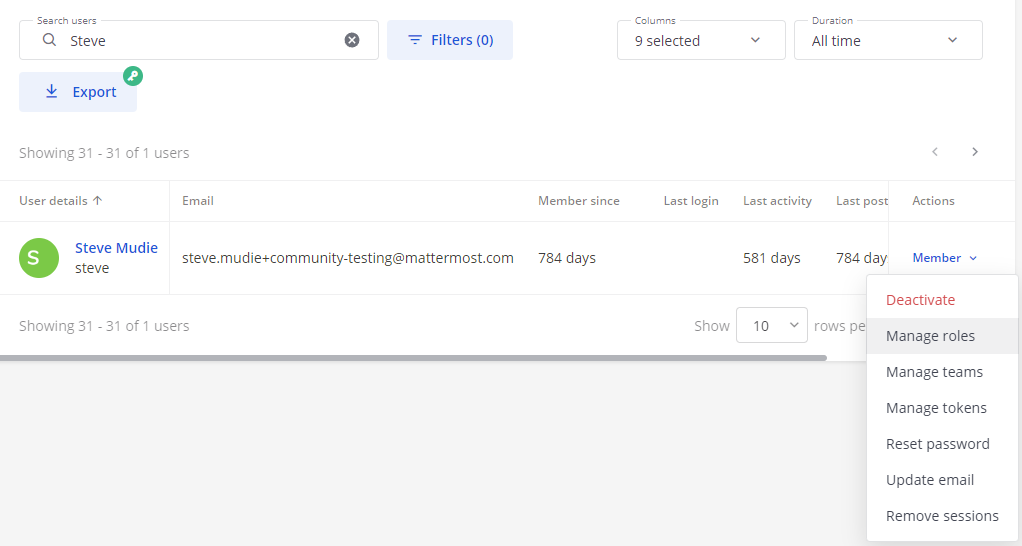
    Apply appropriate Access Token permission through Manage Roles section under User Management using the System Console.

  4. Select Allow this account to generate personal access tokens.
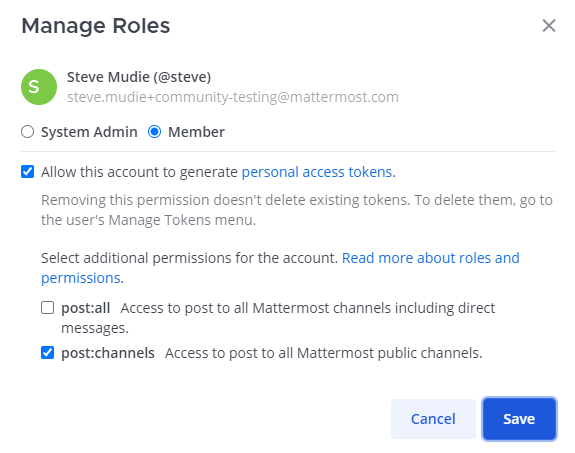
    Provide additional Roles to the user using the User Management section in the System Console

You may optionally allow the account to post to any channel in your Mattermost server, including direct messages by choosing the **post:all** role. **post:channels** role allows the account to post to any public channel in the Mattermost server.

Then select **Save**.
  1. Sign in to the user account to create a personal access token.

  2. Go to Profile > Security > Personal Access Tokens, then select Create Token.
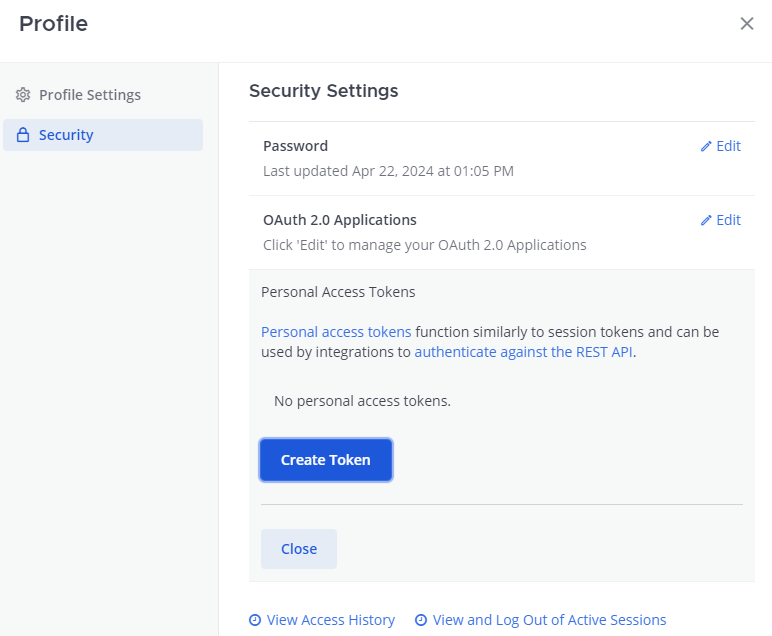
    Create a Access Token in the Security tab under the Profile Menu.

  3. Enter a description for the token, so you remember what it's used for. Then select Save.
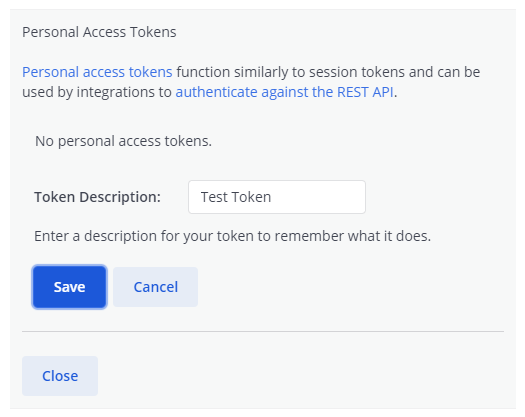
    Save the Access Token with a description.

If you create a personal access token for a System Admin account, be extra careful who you share it with. The token enables a user to have full access to the account, including System Admin privileges. It's recommended to create a personal access token for non-admin accounts.
  1. Copy the access token now for your integration and store it in a secure location. You won't be able to see it again!

  2. You're all set! You can now use the personal access token for integrations to interact with your Mattermost server and authenticate against the REST API.
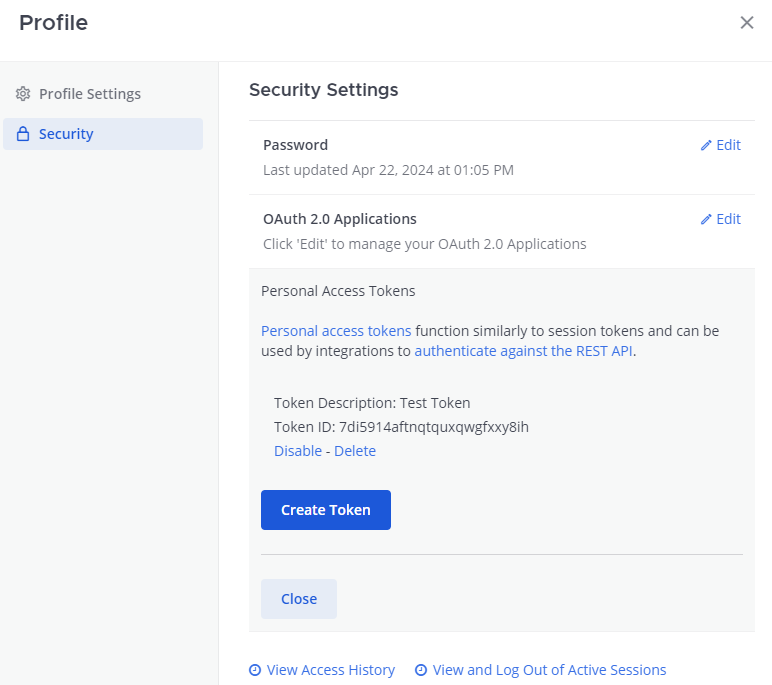
    Find details about the Access Token on the Personal Access Token section in the Security tab of your Profile.

Revoke a personal access token

A personal access token can be revoked by deleting the token from either the user's profile settings or from the System Console. Once deleted, all sessions using the token are deleted, and any attempts to use the token to interact with the Mattermost server are blocked.

Tokens can also be temporarily deactivated from the user's profile. Once deactivated, all sessions using the token are deleted, and any attempts to use the token to interact with the Mattermost server are blocked. However, the token can be reactivated at any time.

User's profile

  1. Sign in to the user account, select the user avatar, then select Profile > Security > Personal Access Tokens.

  2. Identify the access token you want to revoke, then select Delete and confirm the deletion.
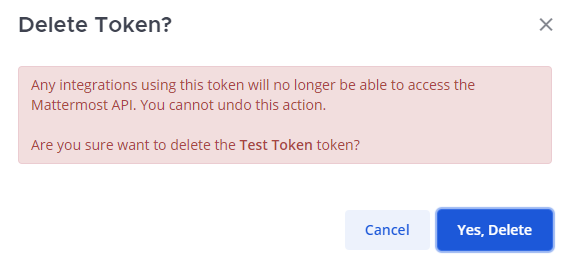
    Delete a Access Token through the Security tab under the Profile section.

System Console

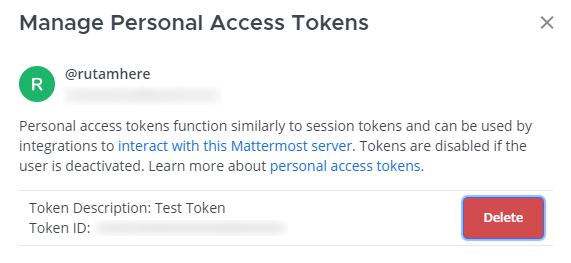
  1. Go to System Console > User Management > Users, search for the user account which the token belongs to, then select Manage Tokens from the dropdown.

  2. Identify the access token you want to revoke, then select Delete and confirm the deletion.

    Delete a Access Token using the Manage Tokens section under User Management in the System Console.

Frequently asked questions (FAQ)

How do personal access tokens differ from regular session tokens?

  • Personal access tokens do not expire. As a result, you can more easily integrate with Mattermost, bypassing the session length limits set in the System Console.
  • Personal access tokens can be used to authenticate against the API more easily, including with AD/LDAP and SAML accounts.
  • You can optionally assign additional roles for the account creating personal access tokens. This lets the account post to any channel in Mattermost, including direct messages.

Besides the above differences, personal access tokens are exactly the same as regular session tokens. They are cryptic random IDs and are not different from a user's regular session token created after logging in to Mattermost.

Can I set personal access tokens to expire?

Not in Mattermost, but you can automate your integration to cycle its token through the REST API.

How do I identify a badly behaving personal access token?

The best option is to go to System Console > Logs and finding error messages relating to a particular token ID. Once identified, you can search which user account the token ID belongs to in System Console > Users and revoke it through the Manage Tokens dropdown option.

Do personal access tokens continue to work if the user is deactivated?

No. The session used by the personal access token is revoked immediately after a user is deactivated, and a new session won't be created. The tokens are preserved and continue to function if the user account is re-activated. This is useful when a bot account is temporarily deactivated for troubleshooting, for instance.