
Files
upstream-mirror 64898b2c79
Some checks failed
Code scanning / CodeQL (push) Failing after 15s
Zulip production suite / Ubuntu 22.04 production build (push) Failing after 26s
Zulip production suite / Debian 12 production install with custom db name and user (push) Has been skipped
Zulip production suite / Ubuntu 22.04 production install and PostgreSQL upgrade with pgroonga (push) Has been skipped
Zulip production suite / Ubuntu 24.04 production install (push) Has been skipped
Zulip production suite / Ubuntu 26.04 production install (push) Has been skipped
Zulip production suite / Debian 13 production install (push) Has been skipped
Zulip production suite / 7.0 Version Upgrade (push) Has been skipped
Zulip production suite / 8.0 Version Upgrade (push) Has been skipped
Zulip production suite / 6.0 Version Upgrade (push) Has been skipped
Zulip production suite / 10.0 Version Upgrade (push) Has been skipped
Zulip production suite / 9.0 Version Upgrade (push) Has been skipped
Zulip production suite / 12.0 Version Upgrade (push) Has been skipped
Zulip production suite / 11.0 Version Upgrade (push) Has been skipped
GitHub Actions Security Analysis with zizmor / zizmor (push) Failing after 3s
Zulip CI / Debian 12 (Python 3.11, backend + documentation) (push) Failing after 26s
Zulip CI / Ubuntu 22.04 (Python 3.10, backend + frontend) (push) Failing after 3s
Zulip CI / Ubuntu 24.04 (Python 3.12, backend) (push) Failing after 25s
Zulip CI / Ubuntu 26.04 (Python 3.14, backend) (push) Failing after 25s
Zulip CI / Debian 13 (Python 3.13, backend) (push) Failing after 28s
Zulip production suite / Required jobs (push) Has been cancelled
Zulip CI / Required jobs (push) Has been cancelled
API Documentation Update Check / check-feature-level-updated (push) Has been cancelled
API Documentation Update Check / notify-if-api-docs-changed (push) Has been cancelled
snapshot of https://github.com/zulip/zulip.git @ 48c69911c7dd4e03b20552eb3bd77ad8151c1357 (2026-09-15)
2026-09-15 15:05:30 +05:00

2.3 KiB

  1. {!create-channel.md!}

  2. {!create-an-incoming-webhook.md!}

  3. Install the "Zulip" plugin by going to Manage Jenkins > Manage Plugins > Available, typing in Zulip, and clicking Install without Restart.

    Plugin installation

  4. Once the plugin is installed, configure it by going to Manage Jenkins > Configure System. Scroll to the section labeled Zulip Notification Settings, and specify your Zulip server address, bot's email address and API key. Optionally, you may configure a default stream or topic. You can also enable smart notifications (i.e. only receive notifications when a build fails or recovers from a failed state).

    (If you don't see this option, you may first need to restart Jenkins.)
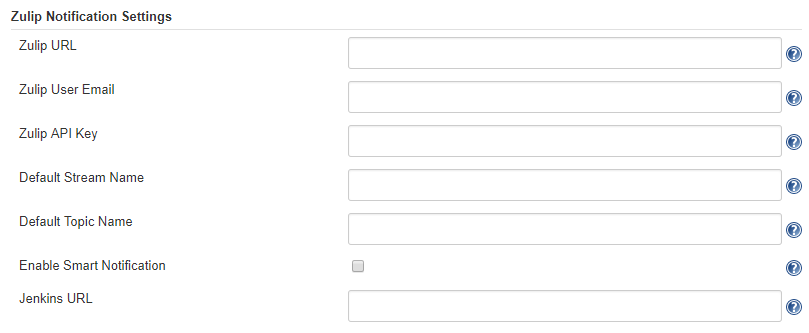
    Plugin configuration

  5. Once you've done that, it's time to configure one of your freestyle projects to use the Zulip notification plugin. On your Jenkins project page, click Configure on the left sidebar. Scroll to the bottom until you find the section labeled Post-build Actions. Click the dropdown and select Zulip Notification. It should look as shown below. If you'd rather not use the defaults from the global configuration, you can set a custom stream and topic. If you don't specify a custom topic, the project name will be used as the topic instead. Then click Save.
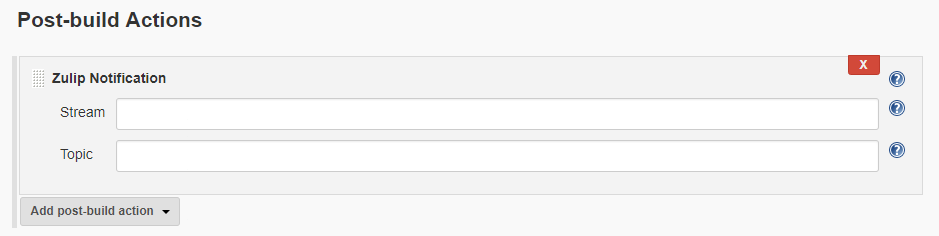
    Post-build action configuration

    When your builds fail or succeed, you'll see a message as shown below.

{!congrats.md!}

Jenkins bot message

Advanced use cases

Besides the Zulip Notification post-build action, this plugin also supports the Zulip Send action. To learn more, see the plugin's README.

Troubleshooting

  1. Did you set up a post-build action for your project?

  2. Does the stream you picked (e.g., jenkins) already exist? If not, create the stream and make sure you're subscribed to it.

  3. Are your API key and email address correct? Test them using our curl API.

  4. Configure a Jenkins log recorder for jenkins.plugins.zulip and check why your messages fail to send.